
Node Operator Guide
... About 9 min
This document provides an overview of how to deploy a Rollux node, based upon Optimism Bedrock. To learn more about how Bedrock itself works and its motivations, please see the specs on GitHub (opens new window).
This document is designed to be a general overview of how to deploy a Rollux node.
# Deployment Overview
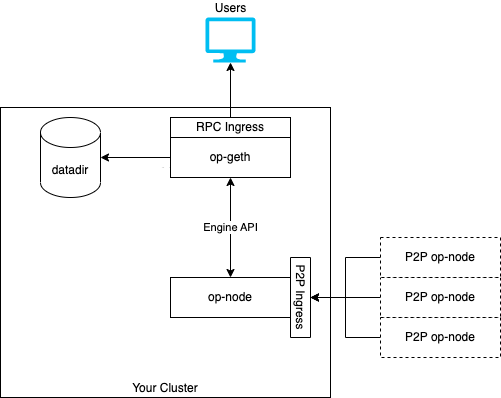
A Rollux deployment consists of two core components:
- The Rollup Node, which is responsible for deriving blocks from L1 and passing them to the Execution engine. It also participates in a peer-to-peer network that synchronizes unsubmitted blocks as the sequencer creates them. We refer to this component as
op-node. - The Execution Engine, which is responsible for executing the blocks it receives from the rollup node and storing state. It also exposes standard JSON-RPC methods to query blockchain data and submit transactions to the network. We refer to this component as
op-geth, since the Rollux Execution Engine is based upon a minimal fork (opens new window) ofgo-ethereum.
The Rollup Node and Execution Engine communicate with each other over JSON-RPC via the Engine API. This is similar to how regular Ethereum networks are deployed. The Rollup Node functions as Rollux's consensus client, and the Execution Engine as its execution client.
The architecture of a typical Rollux deployment looks like this:
# System Requirements
We recommend the following minimum system requirements to run Bedrock:
op-node: Minimum 2CPUs, 4GB RAM. No storage is necessary.op-geth: Minimum 4 CPUs, 8GB RAM. At least 32GB of storage is required for Goerli. At least 600GB of storage is required for mainnet. Storage must be SSD. Requirements are significantly higher for archive nodes.
# Getting the Software
op-geth and op-node are available as Docker images. Consult the documentation for the network you are participating in to get the correct image tag.
Legacy Geth uses version 0.5.29 of our old l2geth image.
You can also compile op-geth and op-node from source.
# Node Configuration
Note
Always run op-node and op-geth in a one-to-one configuration. Don't run multiple op-geth instances behind one op-node, or vice versa.
To configure your node, you will need to do the following:
- Configure
op-nodeto point to the correct L1,op-geth, and L2 network. - Initialize
op-gethwith the correct network parameters. - Configure
op-gethto properly communicate with the Rollup Node. - Optionally, configure Legacy Geth.
# Configuring op-geth
Tips
Even though the Docker image for the Execution Engine is called op-geth, the actually binary is still called geth in order to minimize differences between op-geth and go-ethereum.
We'll start with op-geth's configuration because it is more complex. As mentioned before, op-geth is a minimal fork of go-ethereum. As a result, it stores its state in a database that requires initialization. Initialization is done one of two ways, depending on which network you're deploying:
- With a Genesis File: This is used for testnets or internal deployments that are not migrated from a legacy network. In this case, you'll download the genesis file and initialize the data directory via
geth init. - With a Data Directory: This is used for networks that are migrated from a legacy network. In this case, you'll download a preconfigured data directory and extract it. No further initialization is necessary in this case, because the data directory contains the network's genesis information.
Regardless of how op-geth is initialized, you'll need to ensure that you have sufficient disk space available to store the network's data. As of this writing, the mainnet data directory is ~100GB for a full node and ~1TB for an archival node. The Goerli data directory is ~6GB for a full node.
Instructions for each initialization method are below.
# Initialization via Genesis File
op-geth uses JSON files to encode a network's genesis information. For networks that are initialized in this way, you'll receive a URL to the genesis JSON. You'll need to download the genesis JSON, then run the following command to initialize the data directory:
curl -o <path to genesis JSON> -sL <URL to genesis JSON>

geth init \
	 --datadir="<your data directory>" \
	 "<path to genesis JSON>"
1
2
3
4
5
2
3
4
5
# Initialization via Data Directory
To initialize op-geth with a preconfigured data directory, simply download and extract the data directory to a place of your choosing. The data directory is exported as a tar file. An example command to do this is below:
curl -o <path to data directory> -sL <URL to data directory>
tar -xvf <path to data directory>
1
2
2
# Configuration
Once op-geth is initialized, it can be configured via CLI flags. op-geth accepts all the standard go-ethereum flags (opens new window) as well as a few extra flags that are specific to Rollux. These flags are:
--rollup.historicalrpc: Enables the historical RPC endpoint. This endpoint is used to fetch historical execution data from Legacy Geth. This flag is only necessary for upgraded networks.--rollup.sequencerhttp: HTTP endpoint of the sequencer.op-gethwill routeeth_sendRawTransactioncalls to this URL. Bedrock does not currently have a public mempool, so this is required if you want your node to support transaction submission. Consult the documentation for the network you are participating in to get the correct URL.--rollup.disabletxpoolgossip: Disables transaction pool gossiping. While not required, it's useful to set this totruesince transaction pool gossip is currently unsupported.
To communicate with op-node and enable the Engine API, you'll also need to generate a JWT secret file and enable Geth's authenticated RPC endpoint.
To generate the JWT secret, run the following:
openssl rand -hex 32 > jwt.txt
1
Then, specify the following flags:
--authrpc.addr: Sets the addressop-geth's authenticated RPC should listen on.--authrpc.port: Sets the portop-geth's authenticated RPC should listen on. The default value is8551.--authrpc.jwtsecret: Sets the path to a JWT secret file you generated above.--syncmode=full: This prevents Geth from attempting to snap sync. Snap sync is currently unsupported, but will be enabled shortly after the mainnet upgrade.--maxpeers=0: This prevents Geth from peering with other Geth nodes. Execution-layer peering is currently unsupported, but will be added as part of enabling snap sync.--nodiscover: This disables Geth's peer discovery mechanism. Execution-layer discovery is currently unsupported, but will be added as part of enabling snap sync.
# Optional op-geth Configuration
You may also want to specify the following flags based on your configuration:
--authrpc.vhosts: Whitelists which hosts (as defined in theHostheader) are allowed to access the authenticated RPC endpoint. This is useful if you're runningop-gethon containerized infrastructure. The default value islocalhost.--http.vhosts: Whitelists which hosts (as defined in theHostheader) are allowed to access the unauthenticated RPC endpoint. This is useful if you're runningop-gethon containerized infrastructure. The default value islocalhost.--http,--http.addr, and--http.port: Enables the unauthenticated RPC endpoint, configures its address, and configures its port. You'll almost certainly want to specify these, since they will enable Geth's JSON-RPC endpoint.--ws,--ws.addr, and--ws.port: Enables the WebSocket API.--verbosity: Configures Geth's log level. This is a number between 0 and 5, with 5 being the most verbose. Defaults to 3.
# Working Base Configuration
A valid command that runs op-geth on our beta-1 network and enables RPC over HTTP and WebSockets looks like:
geth \
  --ws \
  --ws.port=8546 \
  --ws.addr=localhost \
  --ws.origins="*" \
  --http \
  --http.port=8545 \
  --http.addr=localhost \
  --http.vhosts="*" \
  --http.corsdomain="*" \
  --authrpc.addr=localhost \
  --authrpc.jwtsecret=/var/secrets/jwt.txt \
  --authrpc.port=8551 \
  --authrpc.vhosts="*" \
  --datadir=/data \
  --verbosity=3 \
  --rollup.disabletxpoolgossip=true \
  --rollup.sequencerhttp=https://bedrock-beta-1-sequencer.optimism.io \
  --nodiscover \
  --syncmode=full \
  --maxpeers=0
1
2
3
4
5
6
7
8
9
10
11
12
13
14
15
16
17
18
19
20
21
2
3
4
5
6
7
8
9
10
11
12
13
14
15
16
17
18
19
20
21
Consult Geth's documentation (opens new window) for more information on customizing op-geth's behavior.
# Configuring op-node
op-node is a standalone, statically linked binary. It stores no state, and requires no initialization. It consumes configuration parameters either via the command line or environment variables. For some networks, the Rollup Node also requires a configuration file (called rollup.json or the "rollup config") that configures network-specific genesis parameters. For official networks like Goerli and mainnet, the genesis config is hardcoded in the op-node software and can be specified via a --network flag.
A minimal valid configuration for a rollup node on our beta-1 testnet looks like this:
op-node --l1=<goerli RPC url> \
        --l2=<op-geth authenticated RPC url> \
        --network=beta-1
        --rpc.addr=127.0.0.1 \
        --rpc.port=9545 \
        --l2.jwt-secret=<path to JWT secret>
1
2
3
4
5
6
2
3
4
5
6
You can manually specify a path to a rollup config with the --rollup.config flag. This is used for testnets or internal deployments that are not migrated from a legacy network.
Each of the above flags can also be defined via an environment variable. Run op-node --help to see a list of all available flags and environment variables.
# Configuring Peer-to-Peer Networking
Unlike the previous system, the op-node participates in a peer-to-peer network. This network is used to distribute blocks that have not been submitted to L1 yet. The op-node will automatically discover and connect to peers using a hardcoded set of bootnodes. You can also manually specify peers to connect to via the --p2p.static flag.
For best results, run op-node with a static IP address that is accessible from the public Internet. For Kubernetes deployments, this can be achieved by configuring a dedicated Ingress with an external IP, and using the --p2p.advertise.ip flag to specify the IP address of the load balancer when advertising IP addresses to peers.
The default port for the peer-to-peer network is 9003. You will need to open this port on your firewall to receive unsubmitted blocks. For your node to be discoverable, this port must be accessible via both TCP and UDP protocols.
# Troubleshooting
# 401 Unauthorized: Signature Invalid
If you see a log that looks like this in op-node:
WARN [12-13|15:53:20.263] Derivation process temporary error attempts=80 err="stage 0 failed resetting: temp: failed to find the L2 Heads to start from: failed to fetch current L2 forkchoice state: failed to find the finalized L2 block: failed to determine L2BlockRef of finalized, could not get payload: 401 Unauthorized: signature is invalid
1
It means that the op-node is unable to authenticate with op-geth's authenticated RPC using the JWT secret. To fix:
- Check that the JWT secret is correct in both services.
- Check that
op-geth's authenticated RPC is enabled, and that the URL is correct.
# 403 Forbidden: Invalid Host Specified
If you see a log that looks like this in op-node:
{"err":"403 Forbidden: invalid host specified\n","lvl":"eror","msg":"error getting latest header","t":"2022-12-13T22:29:18.932833159Z"}
1
It means that you have not whitelisted op-node's host with op-geth. To fix:
- Make sure that the
--authrpc.vhostsparameter inop-gethis either set to the correct host, or*. - Check that
op-geth's authenticated RPC is enabled, and that the URL is correct.
# Failed to Load P2P Config
If you see a log that looks like this in op-node:
CRIT [12-13|13:46:21.386] Application failed message="failed to load p2p config: failed to load p2p discovery options: failed to open discovery db: mkdir /p2p: permission denied"
1
It means that the op-node does not have write access to the P2P discovery or peerstore directories. To fix:
- Make sure that the
op-nodehas write access to the P2P directory. By default, this is/p2p. - Set the P2P directory to somewhere the
op-nodecan access via the--p2p.discovery.pathand--p2p.peerstore.pathparameters. - Set the discovery path to
memoryto disable persistence via the--p2p.discovery.pathand--p2p.peerstore.pathparameters.
# Wrong Chain
If you see a log that looks like this in op-node:
{"attempts":183,"err":"stage 0 failed resetting: temp: failed to find the L2 Heads to start from: wrong chain L1: genesis: 0x4104895a540d87127ff11eef0d51d8f63ce00a6fc211db751a45a4b3a61a9c83:8106656, got 0x12e2c18a3ac50f74d3dd3c0ed7cb751cc924c2985de3dfed44080e683954f1dd:8106656","lvl":"warn","msg":"Derivation process temporary error","t":"2022-12-13T23:31:37.855253213Z"}
1
It means that the op-node is pointing to the wrong chain. To fix:
- Verify that the
op-node's L1 URL is pointing to the correct L1 for the given network. - Verify that the
op-node's rollup config/--networkparameter is set to the correct network. - Verify that the
op-node's L2 URL is pointing to the correct instance ofop-geth, and thatop-gethis properly initialized for the given network.
# Further Reading
Now that you've got your node up and running, check out the Upgrade Guide for what to expect when we upgrade our official testnet and mainnet.